Review an Image-to-Prompt Result Before You Reuse It
Review an image-to-prompt result by checking each claim against the reference image before copying the text into another workflow. Keep visible details, qualify interpretations, and remove invented details. A fluent description can still misread the subject, confuse lighting with material, or name a camera angle more precisely than the image supports.
The useful output is a corrected description with known limits. The tool's input and output guide describes fields such as silhouette, pose, camera, composition, material, rendering and palette. Its FAQ also distinguishes description from exact reconstruction. Reusing the text does not establish that a later image will reproduce the original.
Key Takeaways
- Compare the image and extracted fields side by side before copying.
- Check subject nouns and silhouette before judging style adjectives.
- Separate camera from composition, and palette from material and light.
- Keep uncertain claims visible in the review record rather than silently treating them as facts.

This owned workflow diagram illustrates a reference-to-prompt contract. It is not a screenshot of an extraction or a newly generated result.
Put the reference beside the extracted fields
Review the image at a useful viewing size and preserve the original extracted text. Work on a separate corrected copy so another reviewer can tell what changed. A prompt that reads well on its own gives no evidence that its details match the source.
Use three labels during the comparison:
- Supported: the feature is visible at the supplied resolution.
- Revise: the wording conflicts with the image or overstates what it shows.
- Unknown: the image does not show enough to decide.
Unknown is especially useful for hidden surfaces, exact materials, lens choices and tiny accessories. Do not fill these gaps with familiar character conventions. If a cape covers the back, its hidden clasp remains unknown even when a clasp would make sense.
Confirm the right to reuse the source separately. A successful visual description does not determine ownership, license terms or permission to reproduce a design. Those questions need their own evidence.
Check the subject and silhouette nouns first
Subject nouns determine what the next request asks for. Check them before phrases such as "cinematic" or "highly detailed." If the image shows a lamp replacing a knight's head, describing a helmet with a lamp attached changes the design even when both descriptions sound plausible.
A historical recorded analysis provides a useful example. Its reference shows an armored humanoid with a lit table lamp as its head against a dark background. The saved field table classifies the asset as "Character," gives "Painterly" as the closest style, and describes an open palm gesture, cool metallic silver and warm yellow glow. These are observations from an archived input and saved analysis, not a tool run performed for this article.
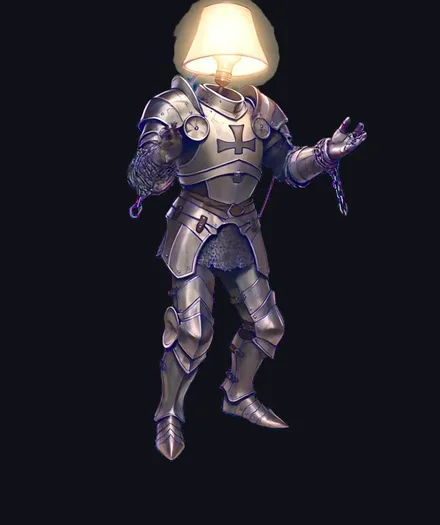
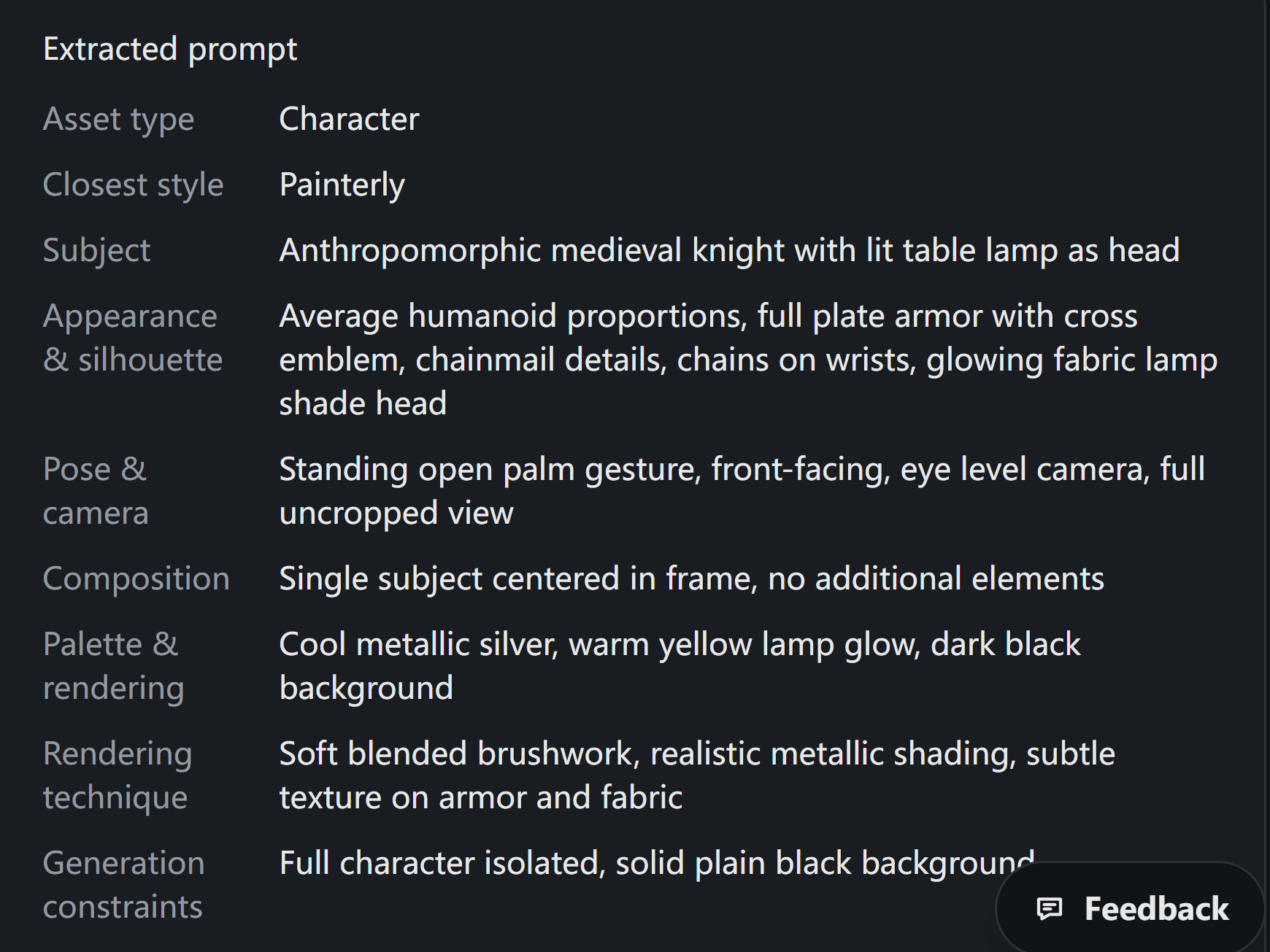
Archived on 2026-10-07 from our own demonstration. The first image is the retained reference; the second is the saved field-table screenshot. They document that recorded extraction, not a new request or a verified complete clipboard prompt. Camera and material wording still require the review described here.
For that record, "table lamp as head" preserves the subject's defining construction. "Armored knight" alone loses it. "Open palm gesture" is a reasonable pose description to compare with the raised hands. The style label is a broad approximation, not a measurement of the original painting process.
The game art prompt examples guide organizes prompts into fields and observable deliverables. Apply that approach here: write down the feature that a reviewer must be able to see, then check whether the extracted wording actually requests it.
| Field | Review question | Correction when needed |
|---|---|---|
| Subject | Does the noun describe the visible object or character? | Replace a generic category with the defining construction. |
| Silhouette | Are the major masses and attachments visible? | Keep visible shapes; remove hidden construction claims. |
| Pose | Does the description match the limbs and gesture? | Describe the visible pose without adding an action sequence. |
| Identity anchors | Which features should survive reuse? | List observable anchors separately from mood and pose. |
The character consistency guide separates visible identity anchors from changing action or emotion. That distinction prevents a pose from becoming an accidental permanent trait. A raised hand can change; the lamp-head construction may be the feature the project needs to preserve.
Separate camera interpretation from composition
Camera describes the apparent viewpoint; composition describes how the subject occupies the image. "Centered, full body" does not establish "front-facing, eye-level." A character can face slightly to one side while remaining centered and fully visible.
The archived field table uses front-facing and eye-level wording. Treat those as interpretations to review, not absolute ground truth. The reference supports a largely frontal presentation with visible depth, but it does not provide camera metadata. If exact angle matters, use cautious wording such as "near-frontal view" and record that camera height is inferred.
Composition is often easier to check directly. Inspect the feet, head and side edges for cropping. Check whether a single subject dominates the frame and whether a background contains visible objects. "No additional elements" should not erase a visible prop merely because the extractor treats it as part of the character.
Keep the two decisions independent in the corrected text:
Viewpoint: near-frontal; exact camera height not established.
Composition: one full-body character, centered on a dark background.
This note describes the review outcome. It is not a complete recreation prompt.
Separate palette, material and lighting
Color words describe appearance, not exact color values. "Cool silver" can be useful when reviewing armor, but it does not specify a reproducible swatch. A warm yellow region may come from emitted light, reflected light or a surface color.
In the historical reference, the lamp glows warmly while the armor has cool highlights and visible purple reflections. The purple is observable, but its appearance does not prove that the armor's base material is purple. "Silver-colored reflective armor with purple reflections" preserves that distinction better than "purple armor."
Check material claims at the same level of caution. Reflective shading can support a metallic appearance. It cannot establish a particular alloy. A lampshade may look fabric-like without revealing its fiber composition. Use "metallic-looking" or "fabric-like" when the exact substance is not known.
Keep rendering language equally bounded. "Painterly" and "soft blended brushwork" describe visible appearance. They do not identify the artist, software or physical technique used to create the source.
Correct fields before copying the final text
Change one field at a time and keep a short reason for each edit. That makes the review traceable and helps avoid introducing a contradiction while fixing another. If a later generation is part of your workflow, compare it against the corrected requirements separately.
Do not assume that a Copy control includes every field displayed on a page. The archived evidence for this example does not establish a complete copied prompt. Before reuse, inspect the actual pasted text and check that it contains the fields you approved. A screenshot of a field table is not proof of the clipboard contents.
Use this acceptance record for one extraction:
Reference ID / file:
Source-use permission checked separately: yes / pending
Original extracted text saved:
Subject and silhouette: supported / revise / unknown
Pose: supported / revise / unknown
Camera interpretation and confidence:
Composition and crop:
Palette appearance, without claiming measured color values:
Material appearance versus known material:
Unsupported details removed:
Corrected text pasted and checked for completeness: yes / no
Decision: accept for descriptive reuse / revise / hold
Reviewer and date:
Accept the text when its important claims match visible evidence and its unknowns will not mislead the next user. Hold it when an unresolved detail changes the design brief. A clear description is useful precisely because it states both what the image shows and what it cannot establish.
Author and disclosure: FrameSprite Workflow Team maintains these workflow notes. The team is affiliated with the product and owns the product sources and diagram linked here; these are not independent product evaluations. This draft was prepared with AI writing assistance. Send corrections through the contact page.
About the author
- We operate FrameSprite, a browser tool for indie game asset workflows. We publish practical sprite-sheet and animation export guides with downloadable examples, verification methods, and explicit limitations. Editorial ownership and corrections: https://www.framesprite.com/about#workflow-team. Contact: https://www.framesprite.com/contact.
Comments
Join the discussionNo comments yet. Be the first to comment.